1ShotPay Integration
Client-Side / iFrame Integration
Embed the 1ShotPay stablecoin wallet in your site via an iframe so users can approve payments without leaving your page.
Introduction
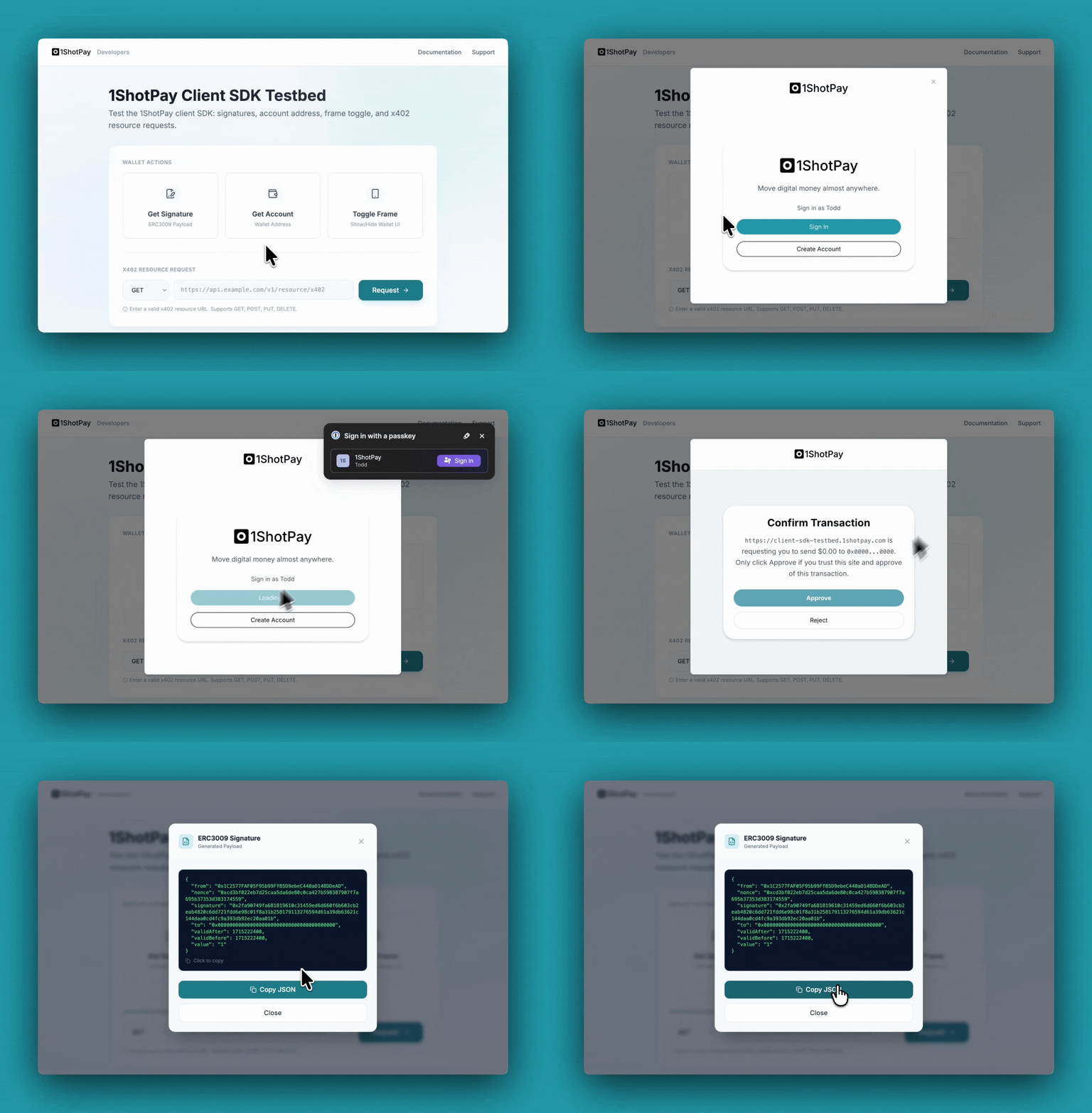
The client SDK lets you embed the 1ShotPay stablecoin wallet in your site via an iframe. When a user clicks a button (for example, “Pay with 1ShotPay”), a card opens and gives them the choice to approve or reject the payment—all without leaving your page.
There are two key payment types:
- Transfer with Authorization: The 1ShotPay wallet returns a signed EIP-3009 payload to the caller for relaying to the Base network.
- x402 Fetch: The caller can request a call to an x402-compatible API endpoint in which the 1ShotPay wallet will handle calling the endpoint from the iframe context.
Install
yarn add @1shotapi/1shotpay-client-sdk @1shotapi/1shotpay-commonImport shared types (e.g. BigNumberString, ELocale, EVMAccountAddress, UnixTimestamp) from @1shotapi/1shotpay-common when you need them.
Quick start
import { OneShotPayClient } from "@1shotapi/1shotpay-client-sdk";
import {
  BigNumberString,
  ELocale,
  EVMAccountAddress,
  UnixTimestamp,
} from "@1shotapi/1shotpay-common";

const wallet = new OneShotPayClient();

await wallet.initialize("Wallet", [], ELocale.English).match(
  () => undefined,
  (err) => {
    throw err;
  },
);

wallet.show();
wallet.hide();

const result = await wallet
  .getERC3009Signature(
    "Some recipient",
    EVMAccountAddress("0x..."),
    BigNumberString("1"),
    UnixTimestamp(1715222400),
    UnixTimestamp(1715222400),
  )
  .match(
    (ok) => ok,
    (err) => {
      throw err;
    },
  );
API overview
OneShotPayClient is the main class. Key methods:
- Lifecycle:
initialize(),getStatus() - Auth:
signIn(),signOut() - Account:
getAccountAddress() - Signatures:
getERC3009Signature(),getPermitSignature() - HTTP:
x402Fetch() - Visibility:
show(),hide(),getVisible()
Visibility
show()/hide()control the iframe modal (the payment card).getVisible()returns whether the modal is currently shown.- Use
show()when the user clicks your “Pay with 1ShotPay” (or similar) button; usehide()when closing the UI or after the flow completes.
Iframe events
Listen for these events from the embedded iframe:
closeFrame— The user closed the UI.registrationRequired— Open the registration URL in a new tab so the user can sign up for 1ShotPay.
See also
Testbed: Try the embedded 1ShotPay functionality at the client SDK testbed.
Example app: See client-side checkout in the 402xPress demo.